All the new features coming in iPadOS 17

estimated read time: 2m 10s
Apple's iPadOS is one of the most advanced tablet operating systems on the market, and it's about to get even better with iPadOS 17.
Here are some of the most exciting features to be coming in iPadOS 17
- Personalized Lock Screen Experience: Taking full advantage of the iPad display, users can now customize the Lock Screen to make it more personal, useful, and beautiful. New photo features allow users to set their favourite images on the Lock Screen and stylize them in new ways. Users can select a photo from their personal library, a dynamic set of photos that shuffle throughout the day, or a Live Photo for a smooth slow-motion effect whenever they wake iPad.
Users can choose a wallpaper from the Lock Screen gallery that will look stunning on the large canvas of iPad, pick from a set of expressive font styles and colours to customize the look of the date and time, or create unique designs with their favourite emoji and colour combinations.
Live Activities comes to iPadOS, allowing users to stay on top of things that are happening in real time right from the Lock Screen, such as a sports game, travel plans, or a food delivery order.
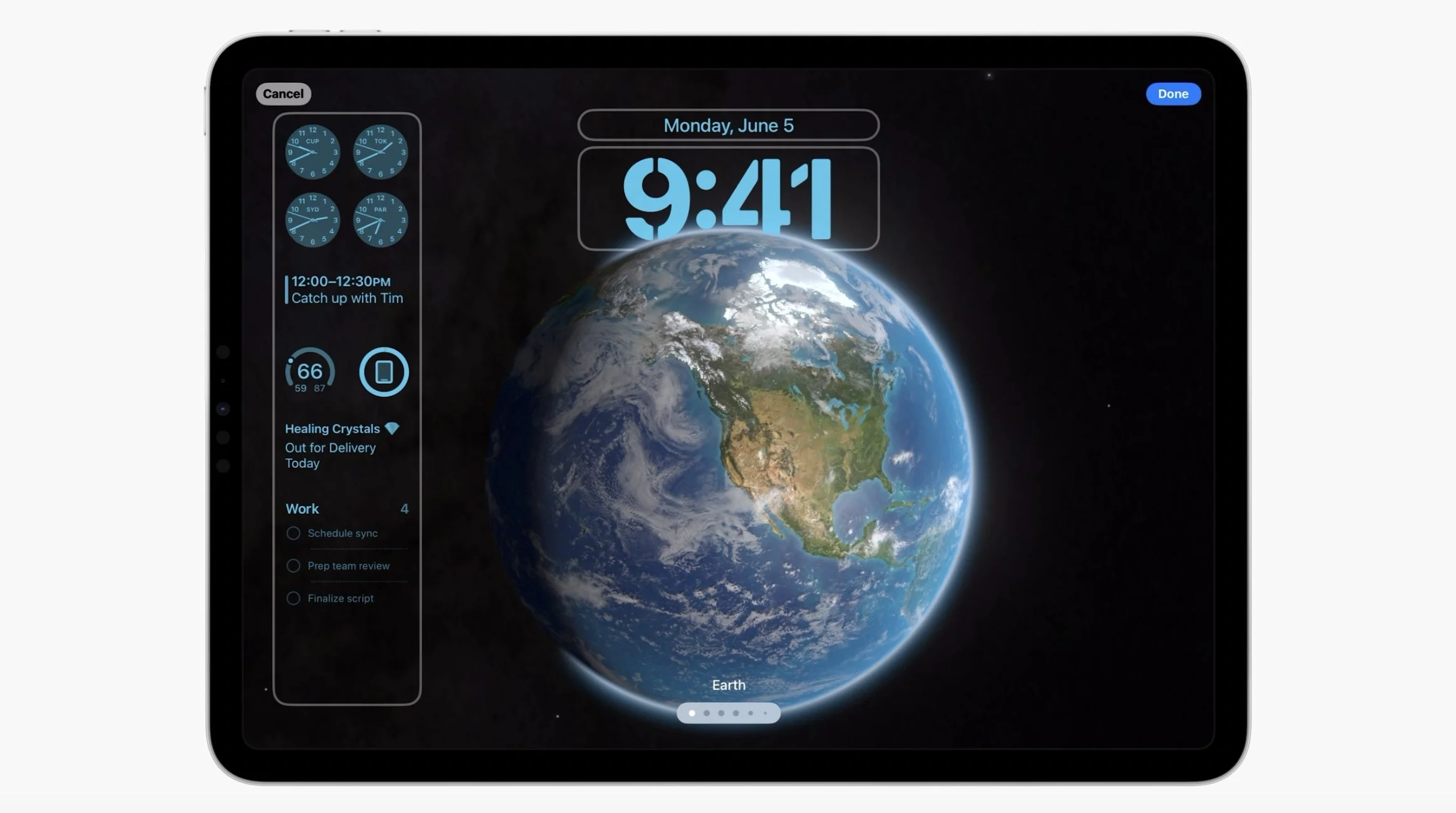
- More Powerful Widgets: Widgets get interactive in iPadOS 17, allowing users to get tasks done with just a tap. For example, users can turn on the lights, play a song, or mark a reminder as complete in the moment, right from a widget. And with updates to WidgetKit, developers can build interactivity into their widgets.
Interactive widgets are now available on the Lock Screen and Home Screen, making it easy to take action and get helpful information at a glance. On the Lock Screen, widgets blend seamlessly with the wallpaper with adaptive tinting to optimize for legibility.
- Stage Manager refinements: Stage Manager is one of the most powerful features of iPadOS, allowing users to run multiple apps side by side in different configurations. Stage Manager gets some new features in iPadOS 17, such as webcam support on external monitors and more flexible layouts.
- Working with PDFs Is Even Easier: Entering information in PDFs is now easier than ever. iPadOS 17 uses machine learning to identify fields in a PDF so that users can quickly add details, such as names, addresses, and emails from Contacts.
- The Health App Comes to iPad: iPadOS 17 brings the Health app to iPad, giving users new ways to see their health data in rich detail. With an optimized design for the iPad display, Favorites has a new look, and users can receive insights into their health data with Trends, Highlights, and detailed interactive charts. Now, iPad users can also track and manage their medications, use Cycle Tracking, log their momentary emotions and daily moods, view their available health records from multiple institutions, and more — all in one central, secure, and private place.
These are just some of the highlights of iPadOS 17, which will be available for download later this year. Stay tuned for more updates on iPadOS 17.


Comments
Post a Comment